 Best Tips and Tutorial for Wordpress Blogger with Plugins, Widgets, premium themes, SEO tricks and social media.
Not just for geeks/computer guys but a personal computer/laptop has become important to almost anyone alive and awake today. Even a 5-year-old knows how to run a computer , isn’t it?
People ranging from all age groups , community , irrespective of their backgrounds are in a need to use Computers as a part of their daily activities. As they say “Technology is the Window to the future”. Ironically , a window to run a computer is actually “Windows”. The operating system on which most of the computers run today , developed by “Microsoft” is Microsoft Windows. The latest version is Windows 8 but it is still not as popular or let say it is still not as widely used as it’s predecessor Windows 7.
How to Fix Windows 7 Not Genuine Error - This copy of windows is not genuine?
So having a complete control over it or using it to the maximum , are the things that a User would want. And that is where the “Genuine” word comes in. Not every user may have the “Genuine Windows 7” operating system. To some extent it is not even possible , if you are a start-up , then you can’t buy Genuine Windows operating system for all the PC’s. You are supposed to but then again what is the need to if you have free tips/tricks. No offense to anyone , would just like to share some ways , using which you can make your Windows 7 “genuine”.
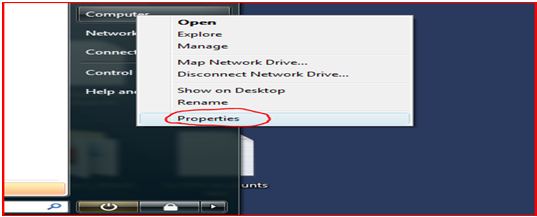
- You can check in whether your version is genuine or not by selecting the properties of “My Computer”
- Then you get a screen which shows whether you Windows is activated or not.
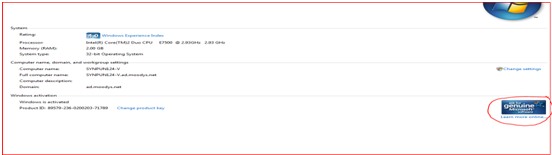
Sometimes , there is a case where your windows is activated & still you get the error message for the same.
How to make Windows 7 version genuine:
- Open command prompt (Go to start menu. Search in programs “cmd”. Then do the following:
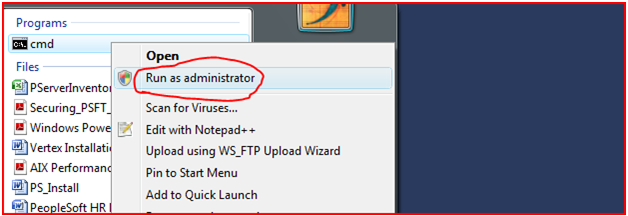
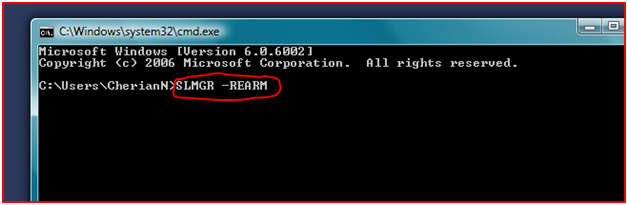
- Type “SLMGR –REARM” and press enter.
- Then you will get a message pop – up like :
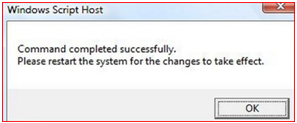
- Restart your machine & enjoy Windows 7 Genuine version.
Another way to achieve this is when you see an error like:
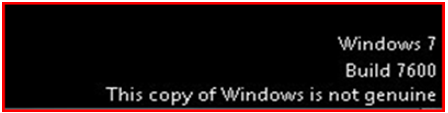
- Download a file “HAL7600” from a torrent site , making sure it is the right file by checking on the verified tag & the comments below the file download link at the page. If you think it is the right file , then go ahead and download the file.
- When you run this , make sure your antivirus software is disabled because like any other utility which acts as an unknown system related file , it will be detected as a malware. So , it is suggested to disable the antivirus for the time being.
Note : If any previous hacks or utilities to serve the same purpose are installed , they need to be uninstalled first.
- Now before running “HAL7600” you need to do a quick repair to avoid discrepancies if any.
- Open command prompt , just like earlier , Run as administrator.
- Now type in “sfc /scannow” and click enter.
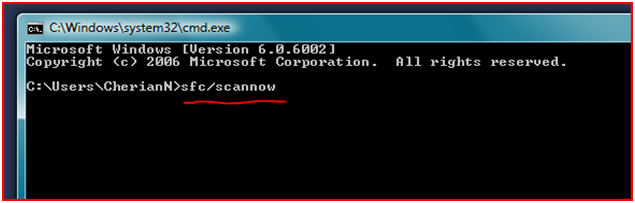
Running the above command in command prompt brings all the key files to their original state.
It is recommended to install .Net framework before installing the “HAL7600” file. Otherwise it will throw an error at run time and ask you to install .Net anyways.
Microsoft .Net can be downloaded using this link
- Now it is time to run “HAL7600” . Once the installation is complete , you can go ahead and enjoy your Genuine Windows 7.
You can also download the various patches named as “Windows loader” available on different sites To make your Windows activated/genuine.