In the world of web sites and blogging, speed means everything. With so many people running WordPress driven sites there is a lot that can slow your site down. Loading issues could be anything from your theme, plugins or even your hosting. Since blogs and web sites are now running so many applications from their own servers and from other shared servers around the world, it’s important to be able to check which plugins are slowing down your site and which are.
First, Run a Free Web Site Speed Test
 One of the first things you can do to check the performance of your web site or blog is to run a free web site speed test. I previously wrote on the topic a few weeks ago and there are a few helpful sites out there that will run a free speed test and tell you how fast your site is loading compared to other sites, and how you can improve your current loading times.
Second, Run a Plugin Performance Test
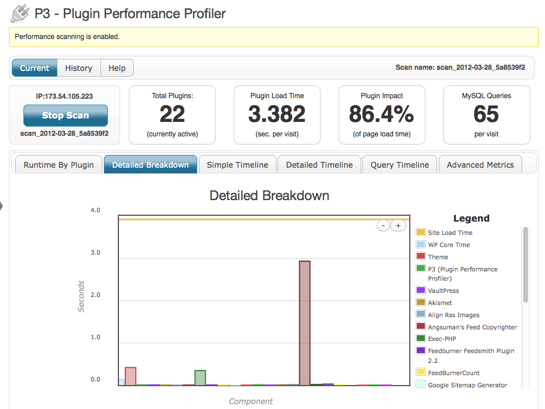
There is a great free plugin called P3 (Plugin Performance Profiler), which runs within your WordPress account and scans through all of your active running WordPress plugins. You will then see a breakdown of all your plugins and how long they are taking to load. Special thanks to Kevin at WordPress Mods for letting me know about the plugin! The plugin is actually from GoDaddy and you can read a full write up and walk through on the plugin here.
I just recently ran the test and saw that the comment plugin was having a much longer loading time over all of the other plugins. So I then removed the plugin and found a much faster alternative.
Not only is your web site speed important for your site visitors, but it also plays an important part in where your site ranks in the search results. If you haven’t done any testing with your loading times, now is a great time to start!
turtle, slow turtle, צב, turtle pictures, slowing down, slow down turtle, pic of turtle, turtle slow, gif turtle pictures, turtle running
Related articles: