


Your ads will be inserted here by
AdSense Now!.
Please go to the plugin admin page to paste your ad code.
WordPress is a very search engine friendly CMS by default. It can be made even more friendly by using essential WordPress SEO settings and plugins. There are currently two very popular WordPress plugins to help you strengthen your site’s search engine friendliness. Yoast’s WordPress SEO Plugin and the Grand old Daddy of SEO plugins, All in One SEO Pack.
I don’t use SEO plugins for my personal websites, but recently I came across a situation where I had to advise someone on search engine optimization, due to their lack of skills with WordPress I had to recommend them a plugin. That’s how I came across this point where I had to choose one of these two great plugins.

Yoast WordPress SEO
Plugin Features
Yoast’s WordPress SEO has more features than All in One SEO. Apart from the usual Title, Meta Description and Meta Keywords optimization, Yoast WordPess SEO offers XML sitemaps, robots.txt and .htaccess configuration, breadcrumbs, RSS optimization and page analysis tool.
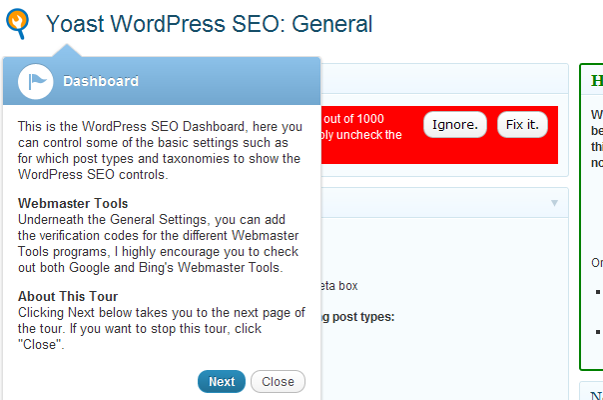
Yoast also makes it easier for new users to understand what it does. Once installed the user is immediately shown a tour that uses the latest WordPress feature of on Screen Tool tips. The tour quickly explains the options a new user would want to configure and it also explains some unique features of the plugin. This is something that all powerful plugins should follow.
The social tab of Yoast’s WordPress SEO allows you to add OpenGraph Meta Data to your site’s section. This helps you better integrate your website with Facebook.
Yoast WordPress SEO also makes it easier for users of All in One SEO plugin to import their data. Users can also export their Yoast SEO settings.
Breadcrumbs is a term used in the user interface design for a navigation trail. Yoast WordPress SEO helps you add and configure breadcrumbs for your WordPress Website. Breadcrumbs also enhance your listing on search engines and increase the visibility as well as relevancy of your listing in the results.
The plugin has a very active community of fans behind it, so community support options for the plugin work very well in most cases. Apart from the official WordPress forums, you can also ask questions about using this plugin on any webmaster forum and it will get answered quickly due to the huge number of fans and web developers who are using this plugin.
Review:
Yoast WordPress SEO is an easy to use plugin even for newbies. However, it does not exactly work out of the box. The user should configure it before it can actually be useful for them. The good thing is that the developer has realized this need and has explained everything without exhausting a new user. I particularly liked the new “tour” feature that quickly familiarizes a new user with the plugin.
Yoast WordPress SEO adds a widget in your Post Edit screen, Where you can see a preview of how your website might appear in search results. The snippet shown with some posts on my site, made me realize why anyone would want to click on this result? This forced me to improve Meta description of several posts and pages on my website.
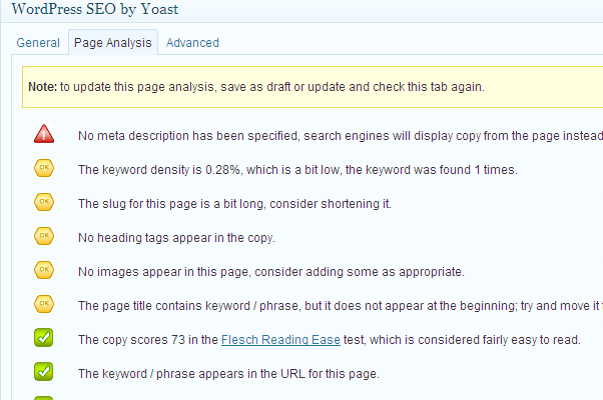
Page Analysis tool in this widget analyzes your post/page and shows your score accordingly. It looks for meta description, title, keywords, usage of main keyword in different sections of the page, word limit, readability, etc. Checking for warnings on this page will improve not only just the search rankings but also the usability of your website. The social tab in the widget allows you to add different descriptions for Facebook and Google Plus.
All in One SEO Pack
Features
All in One SEO pack is around since a long time, it is one of the most popular and well known WordPress plugin. There are less features in All in One SEO Pack than in Yoast WordPress SEO, but it does not mean that All in One SEO Pack is any less powerful.

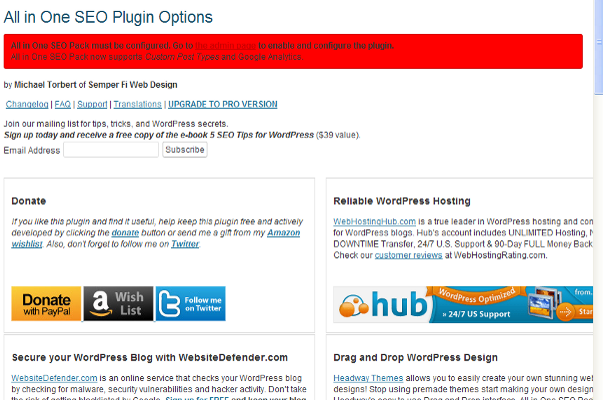
After installing All in One SEO Pack, first thing you notice is that ugly red warning asking you to enable the plugin from the plugin admin page. I wish the plugin authors would at least make it a little less ugly. The admin page, has affiliate links of some famous WordPress Theme and Plugin developers. Skipping the ads you will find the options. If you want to permanently skip the ads then you can subscribe for the paid version of the plugin.
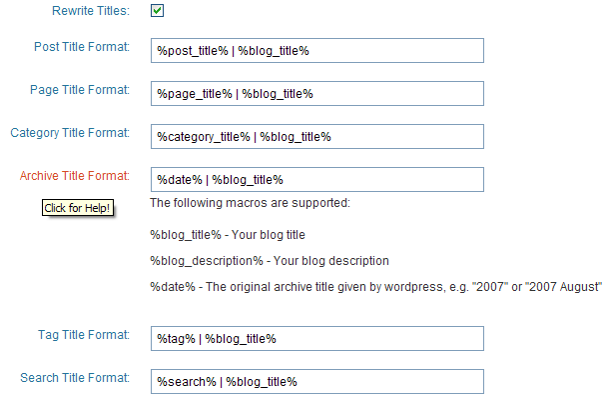
Unlike Yoast WordPress SEO, All in one SEO Pack has this single admin page for the configuration of the plugin. Each setting has a little description that appears when clicked. This page allows you to change the home page Title, Meta Description and keyword options. Then it allows you to choose Canonical URLs, choose title format for Page, Category, tag and other type of content on your website.
The post edit interface for ALL in One SEO pack is also way too simpler. It allows you to change the Title, Description and keywords of the page. You can also leave it blank and the plugin will use your post title as page title, first 150 words for description and tags for keywords.
All in One SEO is around for a long time now. For support and troubleshooting you can ask on official WordPress forums, or upgrade to premium version of the plugin and ask on the plugin website. In 90% cases you will get your question answered on WordPress forums or other webmaster forums. However, remember it is nice to donate and pay for subscription of the plugins to show your appreciation of the work done by the authors.
Review:
There should be no doubt that ALL in One SEO is not as feature rich as Yoast. But it does have some powerful features. I particularly liked the simplicity of options, less choice means that I will not have to spend a lot of time on configuration of the plugin.
All in One SEO plugin works out of the box in most cases. Once enabled it automatically picks up description and keywords from content and tags of your posts. You can configure them yourself if you want but if you have like 1000 or more posts than imagine the time it would take for you to fine tune each single post.
All in One SEO also has Google analytics integrated into it. This means that you can enter your Google analytics ID in the admin section and it will track your visitors. I don’t know why any one would want to do that? I usually paste the analytics code in the footer section of my website so I don’t know why I should use it with All in One SEO.
Conclusion
I think most people would say that Yoast is a clear winner here and maybe they are right. But the thing is that All in One SEO Pack is not a bad plugin either, it does all the things that one would want their SEO plugin to do. Breadcrumbs can be created within your WordPress themes, Keyword Analysis can be done by plugins and browser extensions, there are excellent plugins for sitemaps, and why would anyone want to edit robots.txt and .htaccess inside their admin section? I mean if a user is able to understand and edit these files then they are probably users with advanced skills and can do that manually anyway.
In my opinion All in One SEO is not lacking in features, it does lack in terms of ease of use, support, user friendliness and design. Yoast is a winner because it has an extra layer of polish that is missing from All in One SEO. The pointer tips tour, the page analysis tool, the snippet generator, all of this makes the user experience better.
Your ads will be inserted here by
AdSense Now!.
Please go to the plugin admin page to paste your ad code.
all in one seo vs yoast, all in one seo pack vs wordpress seo by yoast, yoast vs all in one, all in one seo pack vs yoast, yoast vs all in one seo, wordpress seo vs all in one seo, Yoast WordPress SEO, all in one seo or yoast, all in one seo vs yoast seo, yoast seo vs all in one
Related articles:





[...] Read this article: Yoast's WordPress SEO vs All in One SEO Pack | WordPress … [...]
Thanks for the review. I have been using All in one SEO for a few years on my own site, but wanted to check on the differences before choosing one for my new site. I’ll give Yoast a try.
What’s also good from the Yoast plugin, is that you can easily configure rel=author so your Google + pic shows up in the search results.
Recently i shifted from all in SEO to yoast and need a help regarding its setting thanks for these useful tips.
[...] images, usages of headings, outbound links etc.… You can also find some premium versions of these WordPress SEO plugins and Easy WP SEO is what I recommend, if you want to go with a premium [...]
Lately, some of my sites that used to rank very well in search engines have disappeared or pushed down.
I am not sure what it is, but I am considering redoing the SEO. I have All in One SEO plugin installed on my sites. I am wondering if switching to Yoast would make any difference. Thanks for the comparison between the two.
LOTS of problems with this plugin. It messed up my website when installed. I uninstalled and my website is fine now. Someone needs to check this SEO with flash on a website, complete mess.
A few months ago I installed All In One SEO on two websites, which were already ranking at the top on Google for the most relevant words. With one of them it worked fine. The other one just disappeared from Google. The main page was no longer to be found there at all. Only a few weeks after having uninstalled AIOSEO, it reappeared and soon was number one again. I still don’t understand what happened. Any suggestions?
This article is very good, and informative. It gives good advice but still allows you to make your own decision. If I can just add to it from the perspective of someone who does SEO on WordPress. I have used both plugins; all in one and Yoast. My advice would be:
If you have a site using AIO and you’re happy with it’s ranking, leave it alone, keep AIO on the site, and continue to do what you do. I found with a test site I used when I swapped to Yoast the site dropped dramatically.
However, if you are putting an seo plug in on a site for the first time then go straight to Yoast as it’s exceptionally easy to use and gives good rankings.
if you’re new to SEO then Yoast is definately the plug in to use as the ‘traffic light’ system tells you easily how you’re getting on.
I run sites with AIO seo and others with Yoast on; both platforms work exceptionally well but I’d say Yoast gets results quicker, and is more user friendly.
i have used both plugins on by both of the sites i found that aioseo is much simple wheres yoast is a bit complex for new users.one good thing about yoast i liked the most is that it gives the preview
[...] page. The competitor plugin is called SEO By Yoast, which many claim to be better. Here’s a review - all I can claim is that All In One works for me and my [...]
I am using AIO but considering switching to Yoast after reading the post. Is it possible to configure Yoast so metadata of existing pages and posts don’t change?
from my side you are right yost seo is better then the all in seo.
it has many features that the all in seo pack doesn’t have like keyword analysis and key word suggestion’s,
but it is bit difficult for new bewwies
i like all in seo pack
Right,but all in one is also good..but less in feature as compared to yoast seo plugin.
I was using all in one but now i switched to yoast.All in one is good but it doesn’t work for me. My site is based on categories not on individual post so,yoast work great for me because i can write title & description of each of my category whereas in all in one i can’t write.yoast also offers XML sitemaps which include category in sitemap which is quite beneficial for me.
Since i use framework based theme (thesis) i don’t need this my theme has all the necessary SEO options that these plugins have. But before using framework based theme i used to use All in One SEO Pack plugin. Those who don’t have framework based theme it would be good for them to use yoast seo plugin or All in One SEO Pack :)
Arafin Shaon recently posted..Jquery Timeline WordPress Plugin