 Best Tips and Tutorial for Wordpress Blogger with Plugins, Widgets, premium themes, SEO tricks and social media.
How To Turn Google Personalized Search Off?A step-by-step guide for those who don’t need it anymore
Google has been trying to improve its search functionality ever since it started out in the business. Most of the improvements it has brought to search engines are invaluable for searching in the modern world, and have forced their competitors to adapt similar technologies. However, one of the features of the Google search engine, which Google introduced as early as 2004 was personalized search. It has benefits, and it has lots of disadvantages, so here we will introduce it and give you ways to get rid of it if you don’t want it.
Why not keep it ?
You will love Pacman 30th Anniversary.
Frankly, there are a plethora of reasons to get rid of personalized search. If you’re too comfortable with it, you may be able to do sacrifices to keep that feature on board for your account, because it gives you a sense of personalized results, and also includes results depending on what your friends have shared on Google +. But let’s list some reasons why it might not be such a good idea :
- Privacy is the first thing that comes to mind. To extrapolate a personalized search result page, Google needs to remember your personal preferences as well as your previous searches. It does that with a section of your account called Google Web History. Now most of you know where this is going – the information kept their can be used for benevolent and not-so-benevolent reasons. So privacy is perhaps the top reason to disable personalized searches
- Usefulness of results can be problematic, if Google only shows you things you’ve already seen, or similar to those you would “wish to see” according to the Personalized Search system. Think about what you can be missing
- Bias because of your G+ friends. This is a central problem ever since Google+ came aboard. Due to the current system of displaying Personalized Search results, you’ll see results comprised of your friend’s shares. Now that may seem very nifty at first, but think about it – what if you’re friends are biased for one reason or another ? An Android phone may be better for some things, but if your friends are Apple fans, this would reflect your results in a way that you’ll only see pages shared by your biased friends. And that is certainly not okay.
- Wrong readings for SEOs. If you’re into SEO and you want to quickly check the top 10 results for a given keyword, you’ll regretfully find out eventually that your results and other people’s results are quite different. So what you see might not be what everyone else sees.
How to get rid of it ?
So maybe we sold you onto the idea of not having personalized browsing turned on … but the question now would be how to remove Personalized search from your searches.
Well ,the most obvious solution would be to log out of your Google account. In this way, there’s no way to make sure what your search history was, and Google can’t extrapolate and personalize results for you. However that’s not always convenient, is it ? What if you want to keep your account running ?
Well then ,we’ll have to manually turn it off. There are two options available to us. We can change the settings for the current search by clicking the globe icon on the top-right of your Google page: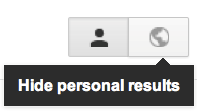
This will enable prevention of displaying the personal results for this page. However , this is just a temporary solution which is not viable if you want to get rid of personalized search for good.
The permanent solution requires you to do the following :
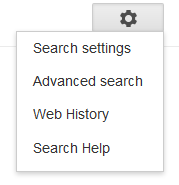
- Click on the gear icon on the top-right corner of Google search and from there, select “Search Settings”
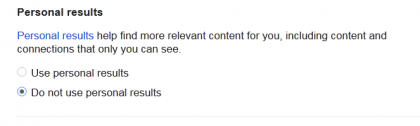
- Scroll down until you see “Personal Results” and change it to “Do not use personal results”
- Scroll further down , and click “Save”.
- Voila! No more personal search.
Hopefully this tutorial has helped you understand not only how, but also why you should probably keep your personalized search turned off , if you care for your privacy and the best results.