 All about WordPress
Samsung galaxy smartphone series become popular in very less time spam getting tag of best android phone. Samsung gets big boost because of tremendous galaxy smart phone series. Samsung S5 released in 2014 was being considered as iPhone 6 rival. Even in US market, Samsung is getting a lot of attention. Samsung galaxy phones come with lot of advanced options which make phone very productive. Samsung galaxy S6 will be released in 2015. Sources believes that it will cost less than S5.
Lets consider you have bought your beautiful Samsung galaxy phone. You complete your all necessary settings and add some data including your important contacts. As time passes, you keep adding new android apps and games which results into consuming maximum memory. Now, in between you find difficult to add some more data in your mobile because memory is full. What you will do? You immediately start deleting least important existing data. In this process, if you unknowingly delete your contacts what will be your reaction?? You will go mad and ask your self how can this happen? No one will like this to happen with them.
It happens at least once with everyone, accidentally or deliberately we regret about lost contact and we want them back. Some people live with it and some smart people Google about “How to retrieve deleted galaxy contacts? ” You are reading this article to recover lost contact from your phone and you will not be disappointed here.
This post will guide you to recover lost contacts from your Samsung galaxy. Just keep calm and follow the steps in this article. In the end if you find this article helpful share it with friends on Facebook and other social media sites.
Recover Lost Contact Using Mobikin
- Yes, it’s very effective tool and it’s free to use. The first step to recover lost contacts is to download MobiKin Doctor for Android software and complete installation.
- Once you have installed Mobikin on your PC launch it and connect your Samsung Galaxy phone using USB cable. Once device is successfully detected go to third step.
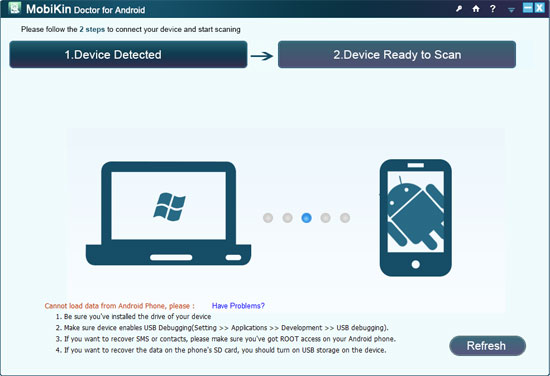
- First check out your android version and follow the next steps. -
For Android 2.3 or earlier: Enter “Settings” < Click “Applications” < Click “Development” < Check “USB debugging”
For Android 3.0 to 4.1: Enter “Settings” < Click “Developer options” < Check “USB debugging”
For Android 4.2 or newer: Enter “Settings” < Click “About Phone” < Tap “Build number” for several times until getting a note “You are under developer mode” < Back to “Settings” < Click “Developer options” < Check “USB debugging”.
- To recover contacts just select the contact you want to recover and click the recover button.
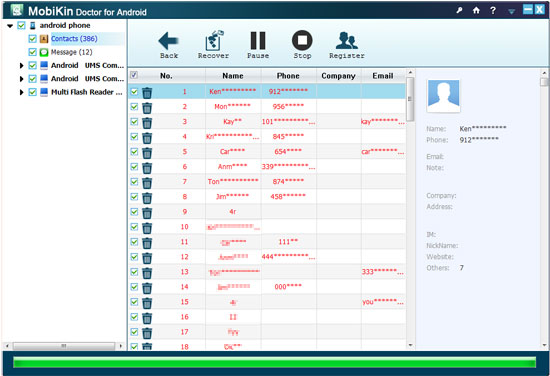
That’s all. You will get access to all the deleted contacts. If you get any problems mention it in comments below. We will definitely try our best to resolve your queries. We hope you will have some smile on your face after successfully retrieving all your deleted contacts. Cheers :)
You can use MobiKin Doctor for Android trial version which is absolutely free. If you convince to buy you can get it for $49.95. It also gives you 30 day money back guarantee.


Recover Deleted Contacts, SMS Messages, Photos, Video, Music and more from Samsung Galaxy, also works with any other Android phones.
http://fb.com/KSOFT.CC/videos/679333125505336