 All about WordPress
It’s not just coding, but even user interface designing is greatly affected by best practices. The better the user interface of your mobile app, more will be your chances of grabbing the attention of targeted audience. In today’s high-paced world, customers are free to choose from hundreds of thousands of mobile applications that can be easily found on different app stores like Google Play, App Store and many more. Hence, in order to make your app stand out, it is critical to equip your app with a highly intuitive user interface which can please the customers on an instant basis. Today, in this post, I’ll be highlighting seven simple-to-follow tips on designing an amazing user interface for your mobile application. So, without any further adieu, let’s hop onto these Mobile UI designing tips.
- Minimalism is the way to go

Unlike regular experiments with the look and feel of a mobile user interface, it is recommended to return to the basics by maintaining minimalism in your app’s user interface. Google and Microsoft are two of the industry biggies which have chosen to design apps while keeping everything as simple as possible. Right from replacing the glossy icons with simple one-color/text-based buttons to adding simple color combinations instead of rich gradients; minimalism is the key to a brilliant mobile user interface.
- Opt for context sensitive navigation

If you’re looking forward to design a dynamic user interface for your mobile app, it is recommended to opt for context sensitive navigation. Here, you need to be clear on which all navigation elements must be visible on the screen all the time and which ones must be shown only under specific scenarios where the user performs a specific action.
- Sketching wireframes is something you shouldn’t miss for sure
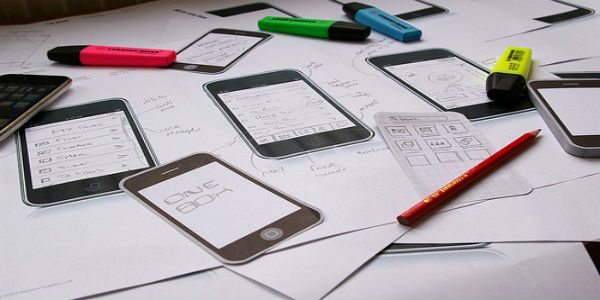
Drafting vital UI/UX design aspects in the form of wireframe is an activity that will allow you to come up with a fabulous mobile user interface. Whether you are a designer or a developer, wireframes will allow you to understand the details of the app in a much more elaborate manner, thereby avoiding the scope of any arguments during the app development process. With well-defines wireframes ready for your use, it would become easier to build a user interface that is easy to use and free from any kind of confusions.
- Pay attention to the correct use of contrast

The task of designing mobile app user interface is mainly affected by the use of contrast. Since users will be using their mobile devices in bright sunlight on a frequent basis, it is recommended to pay special attention to usage of appropriate contrast. You must remember that details tend to get lost, colors might not be distinguished from one another and some vital design elements might completely vanish due to existence of reflections. Make sure all the important elements within the user interface have enough contrast so that they are easy-to-recognize even under stressed situations. Anything absolutely unnecessary must be completely eliminated from the application.
- Legible text should be included

Text readability is considered one of the most crucial aspects of mobile user interface. If users find it difficult to read the words included within your app, they’ll probably opt to go to a different application. By adopting Dynamic Type in your mobile app, you can attain the ability of specifying different text styles for distinct blocks of text such as Footnote, Body etc. By prioritizing content while responding to text-size changes, you’ll be able to offer the users an absolute convenience of going through each and every piece of content that has been placed within the app.
- High-resolution images are a must-have
Switching from low-resolution images to high-resolution images is an easy approach to make your user interface more appealing for people who opt for downloading and using your application. Image with 264ppi or higher resolution can be integrated into the mobile apps for rendering a perfect user experience. It is advised to opt for use of vector-based images because they can auto-scale to suit the resolutions of different mobile screens.
- Integration of ‘Back’ button must be in accordance to the expectations of the targeted mobile platform

It is the ‘Back’ button which navigates an app user back on a consistent basis. For instance, if you’re developing an iOS application, it is recommended to integrate the ‘Back’ button on the top-left corner and if you’re creating an Android application, adding the ‘Back’ button as per the traditional technique is what you need to do. You can simply opt for following OS-specific position and behavior of the ‘Back’ button for developing an interface that meets the end user’s expectations.
Final Words
Now that the seven amazing tips on designing excellent mobile app user interfaces are known to you, I’m sure you’ll be all tempted to come up with an app interface that is both intuitive and impressive.
Author Bio: Victoria Brinsley is a veteran mobile app programmer for Appsted Ltd – one of the reputed mobile app development companies. With her best assistance, clear all your queries related to development process or procedures.